
Last Updated on October 8, 2026
Multimeter Accuracy Calculator
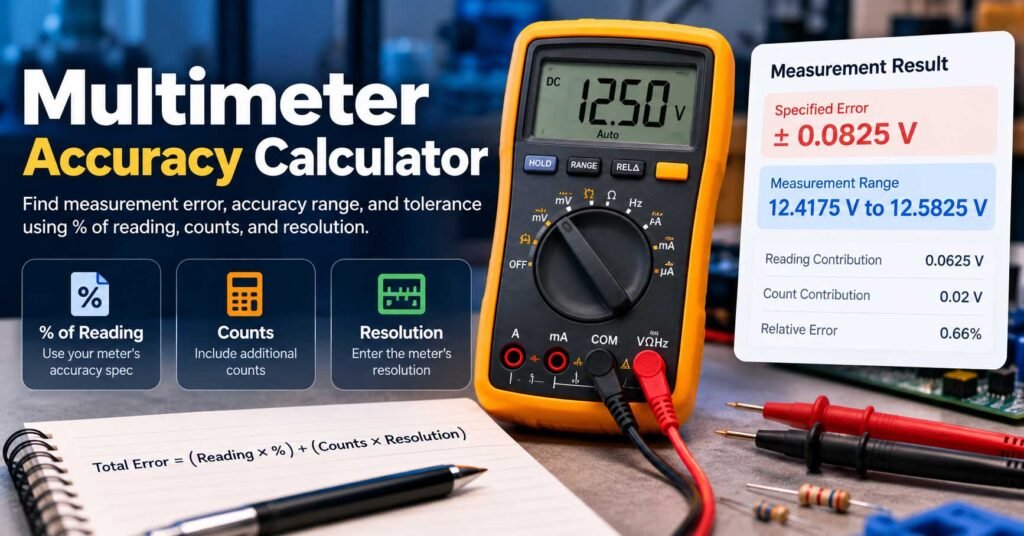
How much can a digital multimeter reading differ from the actual value? Enter the accuracy specification from your meter’s manual, the displayed reading, and the resolution for the selected measurement range. This calculator shows the specified maximum error and the corresponding measurement interval.
Calculate measurement accuracy
Instant results · No signup
Estimated interval based on the published accuracy specification, not a calibration certificate.
- Percentage contribution
- 0.0625 V
- Count contribution
- 0.02 V
- Error as % of reading
- 0.66%
Calculation breakdown
How to use this multimeter accuracy calculator
- Choose the same accuracy specification format shown in your multimeter’s manual. If you need to find the documentation, start with our multimeter user manual collection.
- Enter the number currently displayed by the meter and select its measurement unit. For a refresher on ranges and measurement modes, see our multimeter basics guide.
- Enter the accuracy percentage specified for that measurement function and range.
- For a + counts specification, enter the added counts and the resolution of the active range. For % of range, enter the range span given in the specification.
- Read the maximum specified error, possible measurement interval, and full breakdown.
Understanding the accuracy formula
Digital multimeter accuracy is commonly stated as ±(% of reading + digits/counts). The percentage term changes with the reading. The counts term is the number of least-significant display counts multiplied by the resolution of the selected range. Those values are added to determine the stated absolute error limit.
Example: For 12.50 V, 0.5% of reading is 0.0625 V. Two counts at 0.01 V each contribute another 0.02 V. The total specified error is ±0.0825 V, giving an interval of 12.4175–12.5825 V.
Some advanced meters instead quote a percentage of the measurement range. Always use the specification format for your particular meter; do not confuse % of reading with % of range. If you are new to taking readings, our guide to using a multimeter covers basic measurement functions.
Important limitations
The result assumes that the displayed reading, accuracy terms, and range resolution are provided in the same unit. It also assumes the meter is operating within the conditions required by its manufacturer. Temperature coefficients, AC frequency, crest factor, probe error, calibration status and other conditions can create additional errors. A calculator cannot prove a meter is safe or properly calibrated.
Frequently asked questions
What does ±(0.5% + 2 digits) mean?
It means the maximum specified error includes 0.5% of the displayed reading plus two times the resolution of the least significant displayed digit for the selected range.
Is a 6000-count multimeter more accurate?
Not necessarily. Display count determines available resolution, while accuracy depends on separate specifications. A higher count display does not automatically make the reading more accurate.
Why does multimeter range affect the result?
Changing range often changes the value represented by the last digit. The same number of added counts can therefore contribute a different absolute amount of error.
Can I use this calculator for AC voltage and current?
Yes, if you enter the accuracy specification appropriate to the AC measurement function, frequency, range and stated conditions. Additional terms not represented in this tool must be considered separately.
Is this a calibration test?
No. This calculator interprets a published specification. Calibration requires comparison against suitable traceable reference equipment under controlled conditions.
Related Multimeter Guides & Reviews
Need to check your meter’s range, read its specification sheet, or compare models? These guides from BestMultimeterReviews.org can help you apply the calculator to a real instrument.
Multimeter User Manuals
Find manufacturer manuals and look up the correct accuracy specification for your exact model.
Find your manual →
Beginner guide
Multimeter Basics
Understand measurement modes, units, display readings and why the selected range matters.
Read the basics →
How-to guide
How to Use a Multimeter
Learn basic voltage, current and resistance measurement procedures before interpreting results.
Explore the guide →
Detailed review
Fluke 87V Review
Explore a professional digital multimeter’s measurement capabilities and specifications.
Read the review →
Detailed review
Fluke 115 Review
See the features of a general-purpose True-RMS meter and compare its measurement functions.
Read the review →
Buying comparison
Klein vs. Fluke Multimeters
Compare two multimeter brands when measurement specifications are part of your buying decision.
Compare brands →
Products That May Help
These are relevant product categories for working with and verifying multimeter measurements. Always compare actual safety and accuracy specifications before choosing equipment.
Digital Multimeters
Compare meters with documented measurement ranges and accuracy specifications.
Multimeter Test Leads
Use suitably rated, undamaged leads for your instrument and environment.
Precision Resistors
Useful reference components for low-energy hobby bench checks, not calibration standards.
Affiliate disclosure: As an Amazon Associate, this site may earn from qualifying purchases.